TCA Installation Records
TCA Compliance
If your vehicle operates under a TCA-administered scheme (such as the High Productivity Freight Vehicle monitoring), maintaining an Installation Record is a mandatory requirement, not an option.
Why do you need it?
Under the TCA Functional and Technical Specifications, these records ensure:
Traceability: It proves that a qualified technician installed the type-approved OBM system correctly.
Calibration Integrity: It records the initial calibration values, ensuring the mass readings are accurate from day one.
Compliance Audits: If your business is audited by a transport authority, this document is the primary evidence that your equipment meets the required regulatory standards.
Maintenance History: It establishes a baseline for all future maintenance and re-calibration activities.
How Our App Simplifies Compliance
We’ve taken the guesswork out of regulatory paperwork. Instead of manually drafting logs or managing loose files, our app automatically generates a compliant Installation Record for you. By simply entering a few key details such as your MSU ID, the app compiles a professional, TCA-ready document that is stored securely and ready for inspection at any time.
Note: Without a valid Installation Record, your OBM system may be considered non-compliant, which can lead to fines or exclusion from specific heavy vehicle access networks.
How to Generate an Installation Record
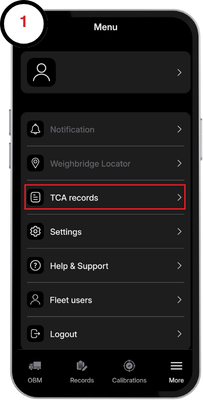
1. Tap the More tab down below and proceed to TCA records
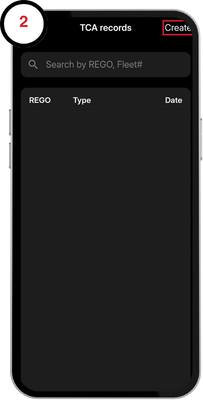
2. Here you can view installation logs, maintenace records and certificates of conformance. Tap create in the top right corner to proceed.
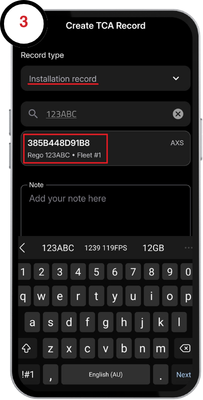
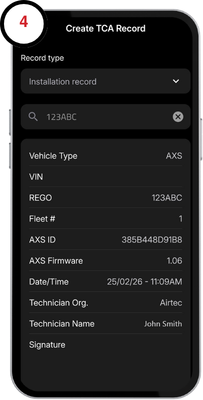
3. Tap the Record type drop down menu and select Installation record. Enter your vehicle registration, fleet number, or serial number and select the device when prompted.
4. The form will automatically be filled with the device information. A signature is also required to be entered if not already set through the account menu.
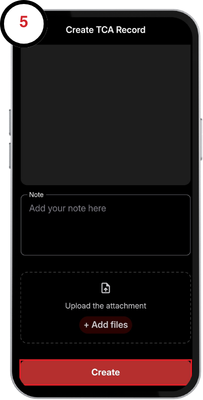
5. Tap on Create at the bottom of the page when you are finished. You can optionally add a note or attach a file if needed.
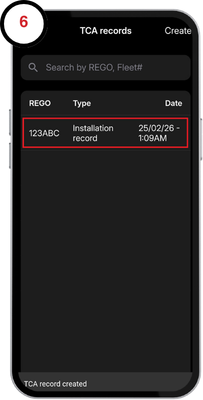
6. Your installation record has now been generated and will appear in your TCA records tab.