TCA Calibration Records
Calibration Reports & TCA Compliance
If your vehicle operates under a TCA-administered scheme, keeping up-to-date Calibration Reports is just as critical as the initial installation. While an installation record happens once, calibration is an ongoing requirement to ensure your mass readings remain accurate over time.
Why do you need it?
Under the TCA Functional and Technical Specifications, regular calibration and the resulting reports ensure:
Ongoing Accuracy: It proves that the system’s weight readings haven't drifted and are still providing precise data for road access compliance.
Regulatory Alignment: TCA schemes require periodic verification. A calibration report is your proof that the system has been tested against a known reference (like a weighbridge).
Operational Security: It protects your business by providing a documented paper trail in the event of a weight dispute or roadside inspection.
System Health: It acts as a recurring check-up, confirming that sensors and Mass Sensor Units (MSUs) are functioning exactly as intended.
Note: Only Fleet Managers and Fleet Admins are able to make a calibration.
To learn how to calibrate, please visit App - How to Calibrate
How to View a Calibration Report
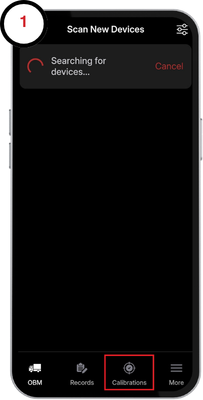
1. Tap the "Calibrations" tab at the bottom of your page.
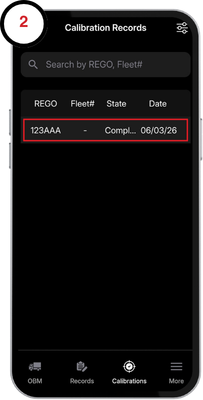
2. Select the calibration from the records table
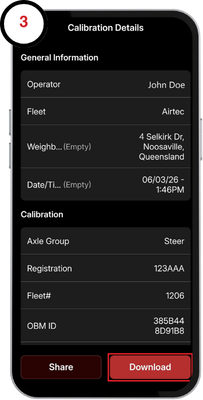
3. Here you can view the details of your calibration on our app. To view the record as a PDF, tap the download button and save the calibration record to a folder
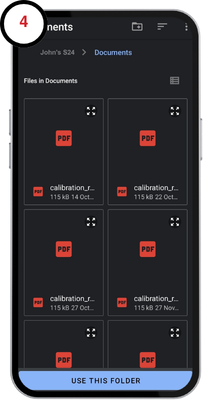
4. Open the files app and select the folder you saved the report to, and tap the PDF to open it.
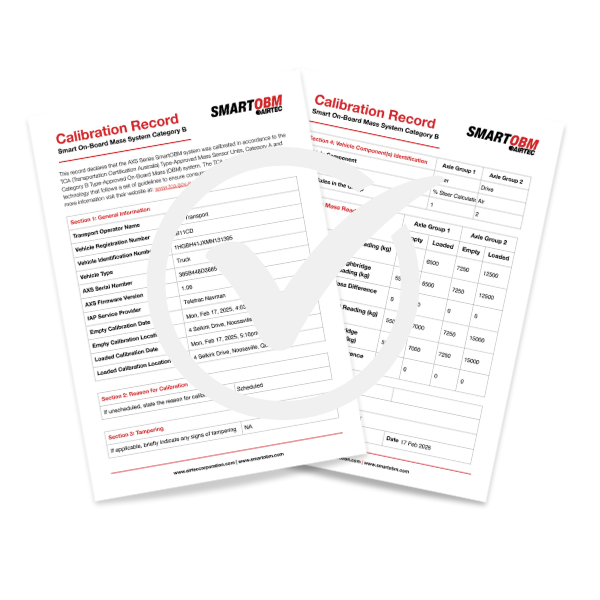
5. Once opened, the calibration report will look like the image below. Two pages for each OBM device will be generated.